Integrations
Integrations connect your OrionIQ agents to external systems, giving them access to additional context and enabling interoperability across your toolchain. For example, an agent can pull data from a ticketing system or push results to a collaboration platform.
To access Integrations, navigate to OrionIQ > Integrations in the left navigation menu.
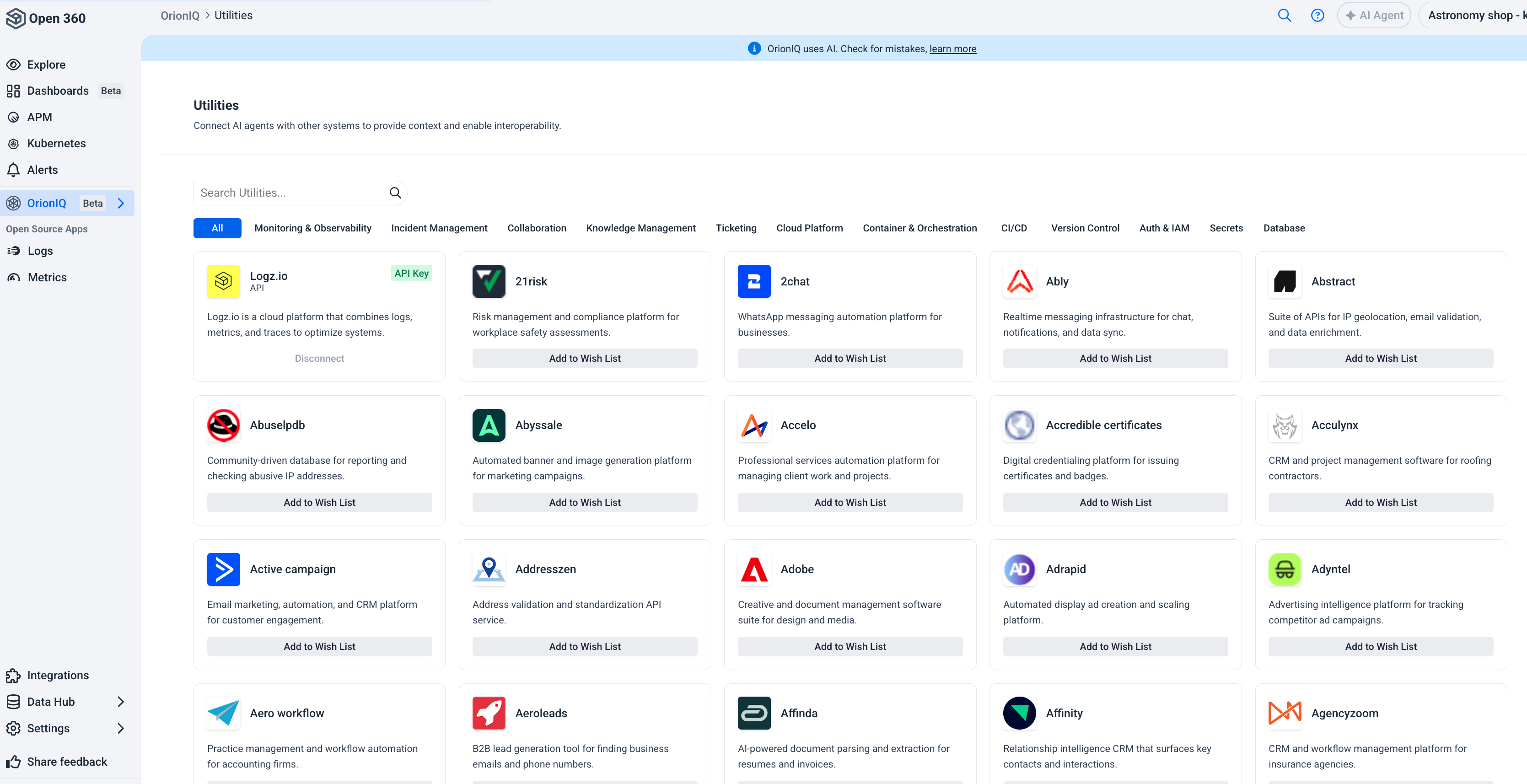
The page has two tabs:
- Catalog — every integration OrionIQ supports, and where you connect one.
- Management — the connections your account has already made, and their health.
Catalog
Integrations are organized into the following categories:
| Category | Examples |
|---|---|
| Observability | Logz.io, Datadog, Grafana, AWS CloudWatch, New Relic |
| Incident Management | PagerDuty, Opsgenie, FireHydrant, incident.io, Rootly |
| Communication | Slack, Microsoft Teams |
| Service Management | Jira Cloud, Jira Service Management, Intercom, Asana |
| Knowledge & Content | Confluence Cloud, Agility CMS |
| Developer Tools | GitHub, GitLab, Argo CD |
| Cloud & Infrastructure | AWS EC2, AWS ECS, AWS EKS, AWS Lambda |
| Databases & Warehouses | AWS DynamoDB, AWS RDS, Azure SQL Database, ClickHouse, Databricks |
| Security & Identity | 1Password, AbuseIPDB, Aikido Security |
| Analytics & BI | Amplitude, Databox, Fathom |
| AI & Machine Learning | Anthropic, AI21 Labs |
| Files & Docs | Airtable, Box, Canva |
| Sales & CRM | Salesforce, Gong, Apollo.io |
| Marketing & Social | ActiveCampaign, Ahrefs |
| Finance & Payments | AWS Cost Explorer, Azure Cost Management, Alpaca |
| HR & People | BambooHR, Ashby, Breezy HR |
Use the search bar to find a specific integration, or click a category tab to filter the list. The catalog is ordered by popularity, so the integrations most accounts connect appear first.
Connect an integration
Click Connect on an integration and provide its credentials. Which method an integration uses depends on the integration:
| Method | Description |
|---|---|
| API Key | Connect using the provider's API token. This is what most integrations use. |
| Basic Auth | Connect with an email address and API token. |
| None | A few public data sources, such as MITRE ATT&CK and Hacker News, need no credentials at all. |
Management
The Management tab lists your account's connections. A Logz.io account with sub-accounts appears as a single connection here — its Needs attention status reflects the account or any of its sub-accounts.
| Column | Description |
|---|---|
| Integration | The connected integration. |
| Space | The space the connection belongs to. |
| Status | The connection's health — see below. |
| Connected by | The user who created the connection. |
| Used by | How many agents use the connection. Click the count to see which ones, with a link to each agent's invocations and its definition. |
| Connection | The connection's name, and the authentication method it uses. |
| Updated by | The user who last changed the connection. |
| Updated at | When the connection was last changed. |
| Validated at | When the connection's credentials were last verified. |
A connection reports one of these statuses:
| Status | Meaning |
|---|---|
| Connected | The credentials are valid and the integration is reachable. |
| Needs reauth | The credentials were rejected and must be re-entered. |
| Expired | The credentials are no longer valid. |
| Unreachable | The provider couldn't be reached. |
| Needs credentials | The connection has no usable credentials. |
Open a connection's actions menu to Configure its credentials, Revalidate it against the provider, or Disconnect it. Both the connect and configure dialogs show the integration's full description under its name.
Agent permissions
By default, agents can only read from a connected integration. To let an agent write to one too — opening a ticket, updating an alert, and so on — grant write access at two levels:
- Account-wide, in OrionIQ > Settings > Account > Agent permissions (admins only). This is the account's master switch: while it's set to Read, no individual connection can be given write access, whatever that connection's own setting.
- Per connection, in the connect form or Configure. Integrations that support write actions show an Agent permissions choice of Read or Read & Write. It's only selectable once the account-wide setting allows it.
Both levels must allow write for an agent to actually write through a given connection. Not every integration supports write actions — those show Read only, with no choice to make.
Logz.io API access
The Logz.io integration is connected by default and gives agents access to your observability data. You can also grant agents scoped access to the Logz.io public API, per account:
| Scope | Grants |
|---|---|
| Telemetry | Logs and metrics access for the agent. Always on for every accessible account and not configurable. |
| Read | The agent can call the Logz.io public API but can't change anything. |
| Write | The agent can create and update Logz.io objects. Implies Read. |
| Admin | The agent has the same role as Manage API Tokens. Implies Read and Write. |
Enabling API access creates one system-generated API token per selected account, at the highest scope you chose. Changing or turning off API access deletes that token; agents keep their telemetry access, and a lower scope gets a new token at that scope.
Owner, sub-accounts, and Security accounts have a public API. Metrics, Timeless, and Restored accounts do not, so API scopes aren't available for them.
To request an integration that isn't yet available, click Add to Wish List on the integration you're interested in. This helps Logz.io prioritize which integrations to support next.
Integrations is an evolving capability. New integrations are added regularly based on user demand.